

Most developers understand what a Content Delivery Network (CDN) is.
The bigger challenge is knowing what should actually be cached in production, what should never be cached, and how to design a scalable architecture that delivers both performance and correctness.
Many teams integrate a CDN like AWS CloudFront but end up caching the wrong content, bypassing caching opportunities, or routing every request through the application server. The result is higher infrastructure costs, increased latency, and unnecessary load on backend services.
This practical guide focuses on the production decisions that matter.
What You’ll Learn
✅ When You Should Use a CDN
A CDN is designed to cache content that rarely changes and serve it from edge locations closer to users. This reduces latency and decreases the number of requests reaching your origin server.
Typical assets that should be cached include:
- Images
- CSS files
- JavaScript bundles
- Fonts
- PDFs
- Videos
- Public blog pages
- Product images
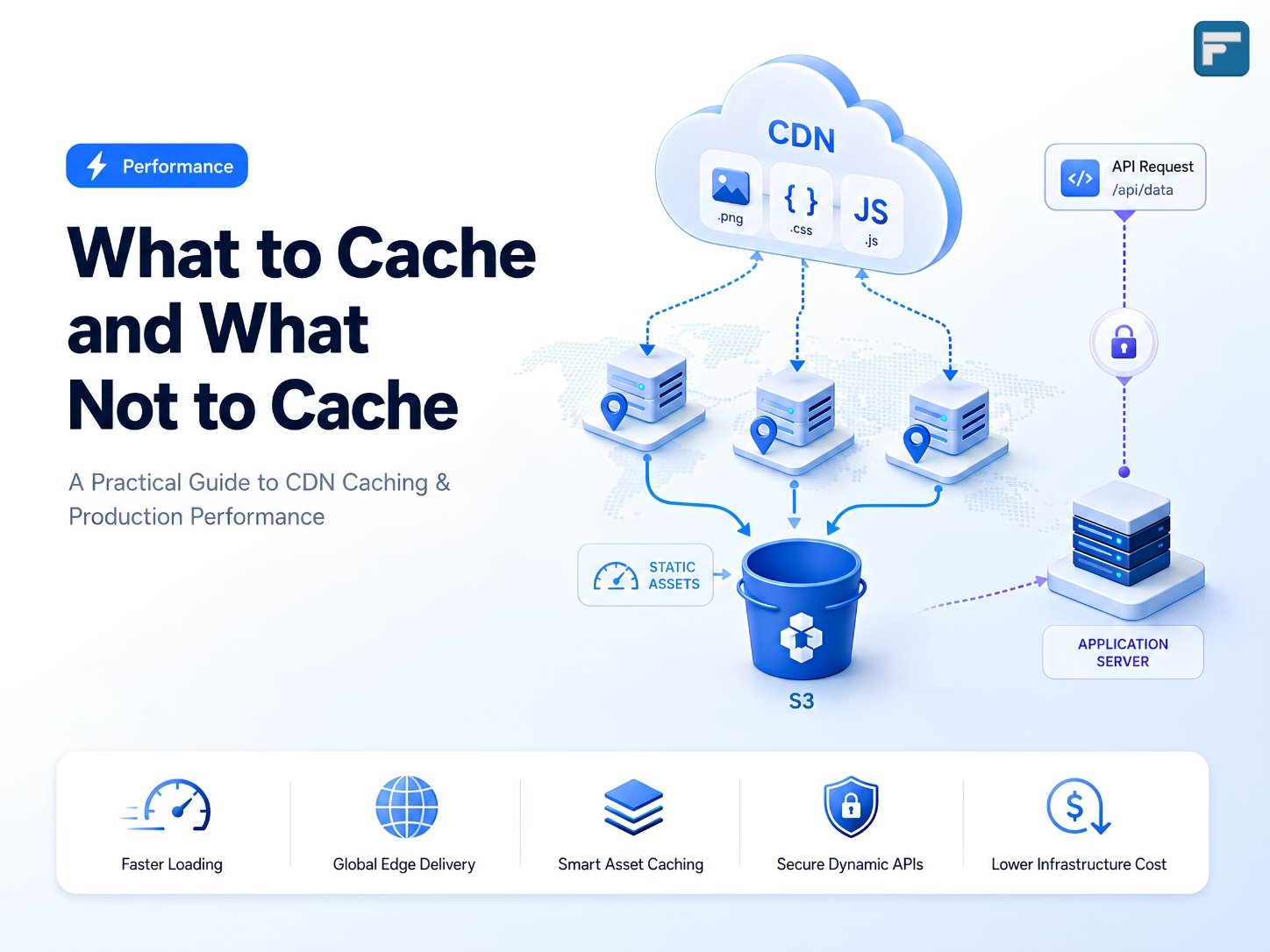
For these resources, CloudFront can serve requests directly from the edge while Amazon S3 acts as the origin, providing faster page loads and lower server utilization.
❌ What You Should Never Cache
Not every request belongs in a CDN cache.
If a response depends on the authenticated user or changes frequently, it should always reach your backend.
Examples include:
- Login APIs
- User profiles
- Shopping carts
- Orders
- Dashboards
- Payment endpoints
- OTP verification
A simple rule to remember:
If the response depends on who the user is, don’t cache it.
⚡ Static APIs Can Be Cached Too
One of the most overlooked optimization opportunities is caching read-only APIs.
Endpoints such as:
- GET /countries
- GET /states
- GET /currencies
- GET /categories
- GET /faq
rarely change and are excellent candidates for CDN caching.
Using appropriate Cache-Control headers, the first request reaches your backend while subsequent requests are served directly from CloudFront, significantly reducing API traffic.
A Production-Ready AWS Architecture
A common production architecture separates static and dynamic content instead of sending everything through a single origin.
A recommended setup includes:
- Amazon Route 53 for DNS
- Amazon CloudFront as the global CDN
- Amazon S3 for static assets and uploads
- Amazon EC2 for backend APIs and server-side logic
- PostgreSQL as the application database
In this architecture, CloudFront uses multiple origins:
- S3 for static assets
- EC2 for dynamic API requests
This ensures users receive cached assets from nearby edge locations while dynamic requests continue to reach the application server securely.
Cache-Control Headers Matter
A CDN is only as effective as the cache headers you configure.
Some commonly used directives include:
public– Allows shared caches such as CloudFront to store the response.private– Restricts caching to the user’s browser.no-cache– Forces revalidation before serving cached content.no-store– Prevents caching entirely.
Choosing the right header is essential to balancing performance with data accuracy.
Common Production Mistakes
Many performance problems are caused by architectural decisions rather than infrastructure limitations.
Some of the most common mistakes include:
- Caching login or authentication APIs
- Serving uploaded files through EC2 instead of S3
- Missing compression
- Shipping unnecessarily large JavaScript bundles
- Uploading oversized images
- Forgetting Cache-Control headers
- Routing every request through a single origin
Remember:
A CDN cannot fix slow SQL queries or poorly optimized frontend code.
Production Checklist
Before deploying to production, verify that your application includes:
- CloudFront CDN
- Amazon S3 for uploads
- Brotli compression
- Long cache durations for JavaScript and CSS
- Pre-signed URLs for secure uploads
- Optimized images
- Lazy loading
- Proper Cache-Control headers
- HTTP/2 and HTTP/3 support
Final Thoughts
A CDN does not make your backend faster.
It reduces the distance users travel to access cacheable content while decreasing the load on your infrastructure.
Before adding more servers, increasing instance sizes, or scaling your backend, ask yourself one simple question:
Can this request be cached?
In many applications, the biggest performance improvements don’t come from adding more infrastructure, they come from reducing unnecessary work through smart caching and better architecture.